# Introduction

Welcome to the Storage Proofs documentation!&#x20;

This site introduces you to Storage Proofs, a powerful on-chain data access solution that enables secure and trustless access to blockchain data across different networks and layers.&#x20;

Storage Proofs are designed to address key challenges in blockchain scalability, interoperability, and data verification. They provide a secure and efficient method for enabling cross-chain data access and historical data verification without introducing new trust assumptions.

In this documentation, you'll learn about:

1. The fundamental concepts behind Storage Proofs
2. Step-by-step workflows for generating and verifying Storage Proofs
3. How to access block hashes and other critical blockchain data
4. Turbo: A user-friendly interface for integrating Storage Proofs into smart contracts
5. Turbo Compute: Verifiable off-chain compute with on-chain verification

Whether you're a blockchain developer looking to enhance cross-chain functionality or a researcher exploring novel consensus mechanisms, this documentation will provide you with the knowledge and tools to leverage Storage Proofs effectively in your projects.

Let's dive in and explore the world of Storage Proofs!


# Use Cases

Storage Proof Use Cases

Here are a few examples of what can be built using Storage Proofs:

| Use Case            | Opportunity                                                                                                                                                                                                                                                            |
| ------------------- | ---------------------------------------------------------------------------------------------------------------------------------------------------------------------------------------------------------------------------------------------------------------------- |
| Cross-chain lending | Lending platforms can offer cross-chain lending by enabling users to secure loans on one chain, supported by a Storage Proof of collateral from another. For instance, securing a loan on a Layer 2 platform using collateral on Ethereum.                             |
| DEX                 | Implement Storage Proofs for margin accounts and withdrawals, ensuring sufficient margin and debt obligations are met across chains.                                                                                                                                   |
| Account recovery    | Trigger a withdrawal to a predefined address if specific criteria are fulfilled. For example, use a Storage Proof showing that the wallet nonce has not changed in over a year.                                                                                        |
| Insurance           | Insurance protocols can leverage Storage Proofs to automate claims based on predefined conditions. Upon risk events, Storage Proofs can be generated and submitted for near-instant on-chain verification, enabling fast, efficient, and transparent claim processing. |
| Governance          | Enable users to vote on Layer 2 using their Ethereum-held assets, verifying voting power without transferring assets.                                                                                                                                                  |
| Bridging            | Verify locked assets on an origin chain using Storage Proofs and initiate the minting of equivalent tokens on the target chain, enhancing security of cross-chain transfers.                                                                                           |
| Gaming              | Enable users to verify ownership of in-game NFTs across different Layer 2s. Utilize Storage Proofs as an app-chain operator to confirm user asset ownership on your app chain.                                                                                         |
| Access to RANDAO    | Provide access to RANDAO randomness generated by the Ethereum Consensus Layer on other chains.                                                                                                                                                                         |
| Circuit Breakers    | Implement protocol safeguards by halting operations if a Storage Proof demonstrates unexpected behaviour on another chain.                                                                                                                                             |

## Explore Integration Opportunities

Have an awesome project idea? We are open to collaboration and integration opportunities!

If you would like to explore integrating your project with Storage Proofs, please complete [this form](https://www.storageproofs.com/contact).


# Quick Start Guide

This guide will help you quickly get started with using Storage Proofs. Follow these steps to submit your first Storage Proof request and access verified blockchain data.

## Proving Account Balance

### Step 1: Sign Up for an API Key

1. Visit the [Herodotus Dashboard](https://dashboard.herodotus.dev/login).
2. Register or log in using your in-browser wallet with Sign in with Ethereum.
3. Once logged in, access your API key from the dashboard.

### Step 2: Prepare Your Storage Proof Request

Construct a POST request to the Storage Proof API. Here's a basic example:

```
{
  "destinationChainId": "11155111",
  "fee": "0",
  "data": {
    "11155111": {
      "block:5150551": {
        "accounts": {
          "0x17C2D875CB397D813eAE817DaFD25807E348Df07": {
            "props": ["BALANCE"],
            "slots": []
          }
        }
      }
    }
  }
}
```

This request proves the balance of a specific account on the Ethereum Sepolia testnet.

### Step 3: Submit Your Request

Send a POST request to:

```
https://api.herodotus.cloud/submit-batch-query?apiKey=YOUR_API_KEY_HERE
```

Replace `YOUR_API_KEY_HERE` with your actual API key.

### Step 4: Check the Status

Use the returned `internalId` to check the status of your request:

```
GET https://api.herodotus.cloud/batch-query-status?apiKey=YOUR_API_KEY_HERE&batchQueryId=YOUR_INTERNAL_ID
```

### Step 5: Access Proven Data

Once the status is "DONE", you can access the proven data through the Facts Registry contract on the destination chain. For Sepolia testnet:

1. Go to the correct [Facts Registry contract on Etherscan](https://sepolia.etherscan.io/address/0x7Cb1C4a51575Dc4505D8a8Ea361fc07346E5BC02#readContract).
2. Use the `accountField` function to retrieve the proven data.

A more in-depth guide can be found here:

{% content-ref url="/pages/fAoHl1RBjnrGxHsLkRNy" %}
[Using Storage Proof API](/guides/using-storage-proof-api)
{% endcontent-ref %}

## Next Steps

* Explore the [full API documentation](https://api.herodotus.cloud/docs) for more advanced usage.
* Check out the Turbo interface for easier integration with smart contracts.
* Try out different types of proofs using the workflow examples.

Congratulations! You've now used Storage Proofs to verify blockchain data. As you become more familiar with the system, you can create more complex proofs and integrate them into your applications.


# Key Concepts

Before diving into the details of Storage Proofs, it's important to understand some key concepts:

1. **Storage Proofs**: A fusion of inclusion proofs, proofs of computation, and zero-knowledge proofs that enable secure verification of blockchain data across different networks and historical states.
2. **Block Hash**: A unique identifier for a block, summarizing all its contents. It's crucial for anchoring Storage Proofs to a specific point in blockchain history.
3. **Block Header**: Contains metadata about a block, including important roots (state, receipts, transactions) used in the Storage Proof process.
4. **Merkle Trees**: Data structures used in blockchains to efficiently and securely verify the contents of large data sets.
5. **Inclusion Proofs**: Demonstrate that a specific piece of data is part of a larger data set (like a Merkle tree) without revealing the entire data set.
6. **Zero-Knowledge Proofs**: Allow verification of information without revealing the underlying data, enhancing privacy and efficiency in blockchain systems.
7. **Turbo**: A smart contract interface that simplifies the integration of Storage Proofs into applications, making cross-chain data access more accessible to developers.
8. **Historical Block Hash Accumulator**: A system that allows smart contracts to access and verify historical block hashes efficiently.
9. **Facts Registry**: A contract that stores and manages proven blockchain data, allowing other contracts to access this verified information.
10. **Cross-Chain Interoperability**: The ability for different blockchain networks to communicate and share data securely, a key use case for Storage Proofs.

Understanding these concepts will provide a solid foundation as you explore the more detailed aspects of Storage Proofs and their applications in the following sections.


# Overview

Storage Proofs are a powerful technology designed to address key challenges in blockchain scalability, interoperability, and data verification. They provide a secure and efficient method for enabling cross-chain data access and historical data verification without introducing new trust assumptions.

### What are Storage Proofs?

At their core, Storage Proofs leverage the cryptographic properties of blockchains to allow applications to securely access, verify, and utilize data from any point in a blockchain's history or from other blockchains. They overcome the challenge of verifying the correctness of historical data, which typically requires significant computation, by shifting the computational burden off-chain while maintaining data integrity.

A Herodotus-defined Storage Proof is a fusion of:

1. **Inclusion Proofs:** Confirm the presence of specific data within cryptographic data structures like Merkle trees or Merkle Patricia trees.
2. **Proofs of Computation:** Validate the execution of multi-step workflows, attesting to the validity of one or multiple elements in extensive datasets.
3. **Zero-Knowledge Proofs:** Streamline the amount of data a smart contract needs to interact with, allowing verification of claims without processing all underlying data.

### How Storage Proofs Work

The general workflow for Storage Proofs involves several key steps:

1. **Accessing the block hash:** Identify and authenticate the block hash containing the data of interest.
2. **Accessing the block header:** Retrieve and verify the block header associated with the block hash.
3. **Determining the desired root:** Extract the relevant root (stateRoot, receiptsRoot, or transactionsRoot) from the block header.
4. **Verifying data against the chosen root:** Use Merkle inclusion proofs to validate the presence of specific data within the appropriate trie structure.

This process can be adapted for various scenarios, such as verifying token balances, transaction data, or receipt information.

### Benefits of Storage Proofs

1. **Enhanced Interoperability:** Enable secure cross-chain data access and utilization.
2. **Scalability:** Shift computational burden off-chain, reducing on-chain resource consumption.
3. **Security:** Maintain data integrity without introducing new trust assumptions.
4. **Efficiency:** Allow for verification of historical data without extensive on-chain computation.
5. **Flexibility:** Give smart contracts access to a broader spectrum of on-chain data, including previously inaccessible historical information.

### Significance of Storage Proofs

* **Data Integrity and Security:** Storage proofs are generated off-chain but verified on-chain, eliminating the need to trust external parties.
* **Efficiency and Scalability:** By generating proofs off-chain, there's a significant reduction in on-chain network resource consumption.
* **Minimized Data Transfer:** Instead of forwarding complete data sets between chains, only block hashes or accumulator roots are sent, against which storage proofs can be verified.


# Workflow

The Storage Proof Workflow enables secure verification of arbitrary on-chain data. Let's break down each step in detail:

### 1. Accessing the Block Hash

Every piece of data on the blockchain belongs to a specific block. The block hash serves as a unique identifier for that block, summarizing all its contents.

* **Purpose:** To establish a trusted starting point for the proof.
* **Process:**
  * For recent blocks (within the last 256 blocks on Ethereum), use the `BLOCKHASH` opcode.
  * For older blocks, utilize the Historical Block Hash Accumulator (refer to the dedicated page for in-depth explanation).
* **Outcome:** A verified block hash that serves as the anchor for subsequent steps.

### 2. Accessing the Block Header

Once we have the block hash, we need to retrieve and verify the corresponding block header.

* **Purpose:** To access crucial metadata about the block and verify its authenticity.
* **Process:**
  1. Retrieve the block header data.
  2. Hash the provided block header.
  3. Compare this hash with the block hash from step 1.
* **Outcome:** A verified block header, giving access to important roots (state, receipts, transactions).

### 3. Determining the Desired Root

The block header contains three important roots:

* `stateRoot`: Summarizes the entire state of the blockchain at that block.
* `receiptsRoot`: Summarizes all transaction outcomes in the block.
* `transactionsRoot`: Summarizes all transactions in the block.
* **Purpose:** To select the appropriate root for the data we want to prove.
* **Process:** Extract the relevant root based on the type of data being verified:
  * For account states or contract storage: use `stateRoot`
  * For transaction receipts: use `receiptsRoot`
  * For transaction details: use `transactionsRoot`
* **Outcome:** A cryptographic root that will be used as the basis for data verification.

### 4. Verifying Data Against the Chosen Root

This step involves proving that specific data exists within the structure represented by the chosen root.

* **Purpose:** To cryptographically verify the existence and correctness of specific data.
* **Process:**
  1. Generate a Merkle proof off-chain, showing the path from the specific data to the chosen root.
  2. Verify this proof on-chain against the root from step 3.
* **Outcome:** Cryptographic certainty that the data existed in the blockchain at the specified block.

### Advanced Verification Scenarios

#### Verifying Contract Storage Data

When verifying data within a contract's storage, additional steps are required:

1. Verify the contract account exists within the state trie.
2. Extract the storage root from the contract account.
3. Verify the specific storage slot data against this storage root.

#### Verifying Historical Transaction Data

For transaction data:

1. Use the `transactionsRoot` from the block header.
2. Verify the transaction exists within the transactions trie.
3. Extract and verify specific transaction fields as needed.

### Efficiency Considerations

* Proofs are generated off-chain to reduce on-chain computational load.
* Only the final verification step occurs on-chain, minimizing gas costs.
* The use of zero-knowledge proofs can further optimize the verification process for complex data structures.

### Security Assurances

* The cryptographic nature of the proofs ensures data integrity.
* No trust in external data providers is required; all verifications are done against on-chain roots.
* The process is resistant to tampering, as any change in the data would invalidate the entire proof.

By following this workflow, developers can create applications that securely access and verify both current and historical blockchain data, enabling a new class of cross-chain and historically-aware smart contracts.


# Workflow Examples

The Storage Proof Workflow will vary slightly depending on the data being proven and how a blockchain stores its data.

Below are simplified workflows for three scenarios: checking a transaction's nonce, finding out a user's token balance, and looking at receipt data.

{% hint style="warning" %}
Note: These workflows are simplified and based on the Ethereum blockchain. Other blockchains may have variations in their structure and requirements.

Additionally, these workflow examples focus on a single blockchain. When using proofs for cross-chain data access, [access to a block hash](/storage-proofs/accessing-block-hash) or relevant [block hash accumulator](https://docs.herodotus.dev/herodotus-docs/protocol-design/historical-block-hash-accumulator) root of the data origin chain is needed.
{% endhint %}

{% tabs %}
{% tab title="Proof of a User's Token Balance" %}

<figure><img src="https://2262114387-files.gitbook.io/~/files/v0/b/gitbook-x-prod.appspot.com/o/spaces%2FZwym4sEzqrcjD80S8guT%2Fuploads%2FGe5dJXlR3wTbp7jfAraJ%2FGraphs%20for%20Documentation%20w%20logo-33.png?alt=media&amp;token=d17aab75-0eb2-4f54-bfb0-acddad1076c2" alt=""><figcaption><p>Retrieving Account Storage Data within an Ethereum Block</p></figcaption></figure>

**Step 1:** Access the block hash.

* Identify the block at which you want to confirm the user's token balance.

**Step 2:** Access the block header.

* Retrieve the block header associated with the identified block hash to ensure its genuineness.

**Step 3:** Determine the Desired Root.

* Extract the **`stateRoot`** from the block header. This represents the entire state of the blockchain at the time of that block.

**Step 4:** Verify the Token Contract Address Exists.

* Utilize inclusion proofs to confirm the token contract's existence given the **`stateRoot`**.

{% hint style="info" %}
Token Contract Address Verification: Before retrieving information from a token contract (e.g., ERC-20, ERC-721), it's essential to confirm that the contract address exists in the **`stateRoot`**. It ensures that you are looking at a genuine contract and not a fictitious or erroneous one.
{% endhint %}

**Step 5:** Determine the Storage Root.

* From the verified token contract account, extract the **`storageRoot`**. This represents the storage of the contract's account at the time of that block.

**Step 6:** Verify the User's Address Exists.

* Utilize inclusion proofs to confirm the user's address exists within the **`storageRoot`**.

{% hint style="info" %}
User Address Verification within the Contract's Storage: Once you've verified the existence of the contract and moved on to the contract's storage (**`storageRoot`**), you need to ensure that the user address exists within that contract's storage. Especially in the case of token balances, this step is critical. If a user has never interacted with a token contract, their address might not exist in that contract's storage. Verifying the user address's presence ensures that the subsequent data retrieval (e.g., token balance) is accurate and relevant to the user in question.
{% endhint %}

**Step 7:** Verify the Token Balance Against the Storage Root.

* Confirm the user’s token balance within the account storage trie.
  {% endtab %}

{% tab title="Proof of Receipt Data" %}

<figure><img src="https://2262114387-files.gitbook.io/~/files/v0/b/gitbook-x-prod.appspot.com/o/spaces%2FZwym4sEzqrcjD80S8guT%2Fuploads%2F1qEZjoC3VpPo9QVxu00D%2FGraphs%20for%20Documentation%20w%20logo-36.png?alt=media&amp;token=5951209d-bce8-4d23-b838-70f7dac6e62c" alt=""><figcaption><p>Retrieving Receipts Data within an Ethereum Block</p></figcaption></figure>

**Step 1:** Access the block hash.

* Identify the block associated with the receipt data you're trying to prove.

**Step 2:** Access the block header.

* Retrieve the block header associated with the identified block hash to ensure its genuineness.

**Step 3:** Determine the Desired Root.

* From the block header, extract the **`receiptsRoot`**. This represents a summary of all transaction outcomes (receipts) in the block.

**Step 4:** Verify the Receipt Data Against the Chosen Root.

* Utilize inclusion proofs to validate the specific receipt data's presence within the **`receiptsRoot`**.
  {% endtab %}

{% tab title="Proof of a Transactions Nonce" %}

<figure><img src="https://2262114387-files.gitbook.io/~/files/v0/b/gitbook-x-prod.appspot.com/o/spaces%2FZwym4sEzqrcjD80S8guT%2Fuploads%2F4VqlyVX3XJ059E6DY1OD%2FGraphs%20for%20Documentation%20w%20logo-35.png?alt=media&amp;token=229f3ee9-e7fe-404b-acd8-a6217b699ef8" alt=""><figcaption><p>Retrieving Transaction Nonce within an Ethereum Block</p></figcaption></figure>

**Step 1:** Access the block hash.

* Identify the block in which the transaction supposedly exists.

**Step 2:** Access the block header.

* Retrieve the block header associated with the identified block hash to ensure its authenticity.

**Step 3:** Determine the Desired Root.

* From the block header, extract the **`transactionsRoot`**. This represents a cryptographic summary of all transactions in the block.

**Step 4:** Prove the Transaction's Existence.

* Utilize inclusion proofs to validate that the specific transaction exists within the **`transactionsRoot`**.

**Step 5:** Extract the Nonce from the Transaction.

* Once the transaction's existence is proven, directly access and retrieve the nonce associated with that transaction.
  {% endtab %}
  {% endtabs %}


# Accessing Block Hash

Block hashes are cryptographic fingerprints of a block's content, encapsulating the entirety of a block's information, primarily its header. In the context of storage proofs, accessing the relevant block hash is the critical first step in affirming the integrity and authenticity of any on-chain data. It lays the foundation for all subsequent verification processes in the storage proof workflow.

Smart contracts can retrieve these block hashes through various methods, each with its own trade-offs and considerations. Let's explore these approaches in detail:

#### **Direct Access using EVM opcode** <a href="#direct-access-using-evm-opcode" id="direct-access-using-evm-opcode"></a>

<figure><img src="https://docs.herodotus.dev/~gitbook/image?url=https%3A%2F%2F1694265157-files.gitbook.io%2F%7E%2Ffiles%2Fv0%2Fb%2Fgitbook-x-prod.appspot.com%2Fo%2Fspaces%252F3TBwtPMEVIGQI1B6u4Ii%252Fuploads%252FDvXQj3eY6uuC64jwEXJo%252FScreenshot%25202023-10-09%2520at%25201.43.10%2520AM.png%3Falt%3Dmedia%26token%3Da4d9e559-d3e3-4de1-b2ca-f8c33046b311&#x26;width=768&#x26;dpr=4&#x26;quality=100&#x26;sign=90ad466b&#x26;sv=1" alt=""><figcaption><p>Ethereum Yellow Paper (<a href="https://ethereum.github.io/yellowpaper/paper.pdf">https://ethereum.github.io/yellowpaper/paper.pdf</a>)</p></figcaption></figure>

Smart contracts can natively utilize the **`BLOCKHASH`** opcode to fetch hashes of the most recent 256 blocks in the Ethereum Virtual Machine (EVM). While straightforward, this method is restricted to a limited timeframe, and accessing older blocks becomes challenging.

This limitation prevents developers from injecting proofs of arbitrary on-chain data into their smart contracts, as they cannot easily verify inclusion proofs against historical block hashes.

#### **Utilizing Third-Party Providers** <a href="#utilizing-third-party-providers" id="utilizing-third-party-providers"></a>

Alternately, an off-chain actor could forward block hashes on-chain. However, this approach introduces latency and usually requires trusting a third party, a committee or similar. Additionally, it potentially introduces vulnerabilities tied to economic incentives or adversarial behaviours.

#### [**Historical Block Hash Accumulator**](https://docs.herodotus.dev/herodotus-docs/protocol-design/historical-block-hash-accumulator) <a href="#historical-block-hash-accumulator" id="historical-block-hash-accumulator"></a>

<figure><img src="https://docs.herodotus.dev/~gitbook/image?url=https%3A%2F%2F1694265157-files.gitbook.io%2F%7E%2Ffiles%2Fv0%2Fb%2Fgitbook-x-prod.appspot.com%2Fo%2Fspaces%252F3TBwtPMEVIGQI1B6u4Ii%252Fuploads%252FWsP07xycUKn3DHYTjc5e%252FGraphs%2520for%2520Documentation-37.png%3Falt%3Dmedia%26token%3Dac589352-623c-4f49-a62f-5a971aca37a9&#x26;width=768&#x26;dpr=4&#x26;quality=100&#x26;sign=47814790&#x26;sv=1" alt=""><figcaption><p>Root of Merkle Mountain Range Accumulator</p></figcaption></figure>

The Historical Block Hash Accumulator can be used to circumvent these issues. It enables on-chain smart contracts to derive older block hashes by validating them against a stored accumulator root (MMR Root). The methodology eliminates the need to trust external actors and widens the accessible range of block hashes without sacrificing security.

This approach uses a Merkle Mountain Range (MMR) data structure where block hashes are continuously added, and the MMR root is periodically committed on-chain. Smart contracts can then verify any historical block hash against this root, maintaining the trustless nature of blockchain interactions while providing efficient access to historical data.


# Storage Proof API

The Storage Proof API enables developers to request Storage Proofs quickly and easily. There is no need to understand cryptography, zero-knowledge proofs, or how to write circuits. The API handles scheduling, mutualizes many costs associated with generating Storage Proofs and saves developers significant time so they can focus on building their on-chain data-powered applications.

Requests to this API initiate actions or processes, like running the Storage Proof Workflow.

Note: Using these endpoints incurs charges based on resource usage.

## API Endpoint

**URL:** `https://api.herodotus.cloud`

## Interactive Documentation

**URL:** `https://api.herodotus.cloud/docs`

## Key Features

* Simplified Storage Proof generation process
* Cost-efficient through mutualization
* Time-saving for developers
* Easy integration with blockchain applications

## Getting Started

1. Obtain your API key from the Herodotus Dashboard.
2. Review the interactive documentation for detailed endpoint information.
3. Make your first API request to generate a Storage Proof, including your API key for authentication.
4. Handle the API response in your application.

For additional support or questions, please contact our support team.


# Authentication

To use the Storage Proof API, you need to obtain an API key:

1. Visit the [Herodotus Dashboard](https://dashboard.herodotus.dev/login).
2. Register or log in using your in-browser wallet with Sign in with Ethereum.

<figure><img src="https://2262114387-files.gitbook.io/~/files/v0/b/gitbook-x-prod.appspot.com/o/spaces%2FZwym4sEzqrcjD80S8guT%2Fuploads%2FsuoswnkiMJ77u2hJryFE%2Fdashboard.herodotus.dev_login.png?alt=media&amp;token=fb884feb-af1f-470c-847e-5330dc5e81f3" alt="" width="563"><figcaption></figcaption></figure>

3. Once logged in, you can access your API key from the dashboard.

<figure><img src="https://2262114387-files.gitbook.io/~/files/v0/b/gitbook-x-prod.appspot.com/o/spaces%2FZwym4sEzqrcjD80S8guT%2Fuploads%2F7GwIoGfeHy4IyxE3rqZu%2Fdashboard.herodotus.dev_overview.png?alt=media&amp;token=84ed85cd-9ce7-4cb7-b4ae-91baaf31b10d" alt="" width="563"><figcaption></figcaption></figure>

4. Include this API key in your requests to authenticate with the API.


# Payload Examples

Here are 4 different sample batch query payloads for Header Access, Account Access, Account Storage Access, and an additional example. Let's go through each of them:

## Header Access

```json
{
  "destinationChainId": "SN_SEPOLIA",
  "fee": "0",
  "data": {
    "11155111": {
      "block:5856869": {
        "header": [
          "STATE_ROOT",
          "TIMESTAMP",
          "BLOCK_NUMBER",
          "GAS_LIMIT",
          "GAS_USED"
        ]
      }
    }
  }
}
```

This query is requesting specific header information from block 5856869 on the Sepolia testnet (chain ID 11155111). It's asking for the state root, timestamp, block number, gas limit, and gas used. The results will be proven and made available on the Starknet Sepolia network (`SN_SEPOLIA`). This query is useful for accessing and verifying key block header information across different networks.

Example request: <https://dashboard.herodotus.dev/explorer/query/01J2VM6636VWW45ZRPGEQEZ5E5>

## Account Access

```json
{
  "destinationChainId": "11155111",
  "fee": "0",
  "data": {
    "11155111": {
      "block:5150551": {
        "accounts": {
          "0x17C2D875CB397D813eAE817DaFD25807E348Df07": {
            "props": ["BALANCE"],
            "slots": []
          }
        }
      }
    }
  }
}
```

This query is focused on retrieving the balance of a specific Ethereum account (`0x17C2D875CB397D813eAE817DaFD25807E348Df07`) at block 5150551 on the Sepolia testnet. The query is both initiated and proven on the Sepolia network (chain ID 11155111). This type of query is helpful for verifying an account's balance at a specific point in time, which could be useful for various financial applications or audits.

Example request: <https://dashboard.herodotus.dev/explorer/query/01J2VM6JSA6VKKZ0ENWGYYPR18>

## Account Storage Access

```json
{
  "destinationChainId": "SN_SEPOLIA",
  "fee": "0",
  "data": {
    "11155111": {
      "block:5856869": {
        "accounts": {
          "0x76a1b9e4712e45c4c3d0ac6e2c3028ee0ce4d3b0": {
            "props": ["STORAGE_ROOT"],
            "slots": [
              "0x000000000000000000000000000000000000000000000000000000000000000b"
            ]
          }
        }
      }
    }
  }
}
```

This query is requesting the storage root and the value of a specific storage slot (`0x000000000000000000000000000000000000000000000000000000000000000b`) for a particular account (`0x76a1b9e4712e45c4c3d0ac6e2c3028ee0ce4d3b0`) at block 5856869 on the Sepolia testnet. The results will be proven on the Starknet Sepolia network. This type of query allows verification of specific data stored within a contract.

Example request: <https://dashboard.herodotus.dev/explorer/query/01J2VM6Y5JH6BG3AP73K3YJRM7>

## Additional Example (Multiple Data Points):

This more complex query combines multiple types of data requests in a single batch. It's requesting:

* Header information (state root and timestamp) for block `6373286`
* Balance, nonce, and storage root for the account associated with the ENS name `kozi.eth`
* Code hash and a specific storage slot value for the account `0x08210F9170F89Ab7658F0B5E3fF39b0E03C594D4`

{% hint style="info" %}
Remember to replace "<https://your-webhook-url.com/callback>" with your actual webhook URL where you want to receive the results.
{% endhint %}

```json
{
    "destinationChainId": "11155111",
    "fee": "0",
    "data": {
        "11155111": {
            "block:6373286": {
                "header": [
                    "STATE_ROOT",
                    "TIMESTAMP"
                ],
                "accounts": {
                    "kozi.eth": {
                        "props": [
                            "BALANCE",
                            "NONCE",
                            "STORAGE_ROOT"
                        ],
                        "slots": []
                    },
                    "0x08210F9170F89Ab7658F0B5E3fF39b0E03C594D4": {
                        "props": [
                            "CODE_HASH"
                        ],
                        "slots": [
                            "0x0000000000000000000000000000000000000000000000000000000000000001"
                        ]
                    }
                }
            }
        }
    },
    "webhook": {
        "url": "https://your-webhook-url.com/callback",
        "headers": {
            "Content-Type": "application/json"
        }
    }
}
```

These examples demonstrate different ways to use the Storage Proof API for accessing various types of blockchain data. The results will be sent to the specified webhook URL, allowing for asynchronous processing of the data once it's available.

Example request:&#x20;

<https://dashboard.herodotus.dev/explorer/query/01J3N2MB216H2QFBS91JJC6QRF>


# Turbo

Turbo is a powerful smart contract interface that enables developers to seamlessly integrate Storage Proofs into their applications. By abstracting away the complexities involved in generating and verifying Storage Proofs, Turbo provides a user-friendly way to access and utilize blockchain data across different chains.

## Key Features

* **Simple Integration:** Turbo significantly simplifies the process of incorporating Storage Proofs into smart contracts, making it accessible to developers of all skill levels.
* **Cross-Chain Data Access:** Enables smart contracts to access current and historical data located on other chains.
* **Synchronous Transactions:** From an end-user perspective, Turbo offers synchronous transactions, eliminating the need for additional steps after sending a transaction.

### Benefits for Developers

* **Focus on Core Logic:** Developers can concentrate on their application's core functionality without worrying about the intricacies of Storage Proofs workflow.
* **Enhanced Functionality:** Enables the creation of data-rich applications with access to historical and cross-chain data.
* **Simplified User Experience:** End-users interact with Turbo-enabled contracts as easily as using a specialized RPC.

### Getting Started

To interact with Turbo, developers can utilize specialized RPCs that abstract away the complexities of working with Storage Proofs. These RPCs provide a user-friendly interface for submitting Turbo transactions and retrieving necessary data.

For more detailed information on implementation and best practices, please refer to our API documentation and developer guides.


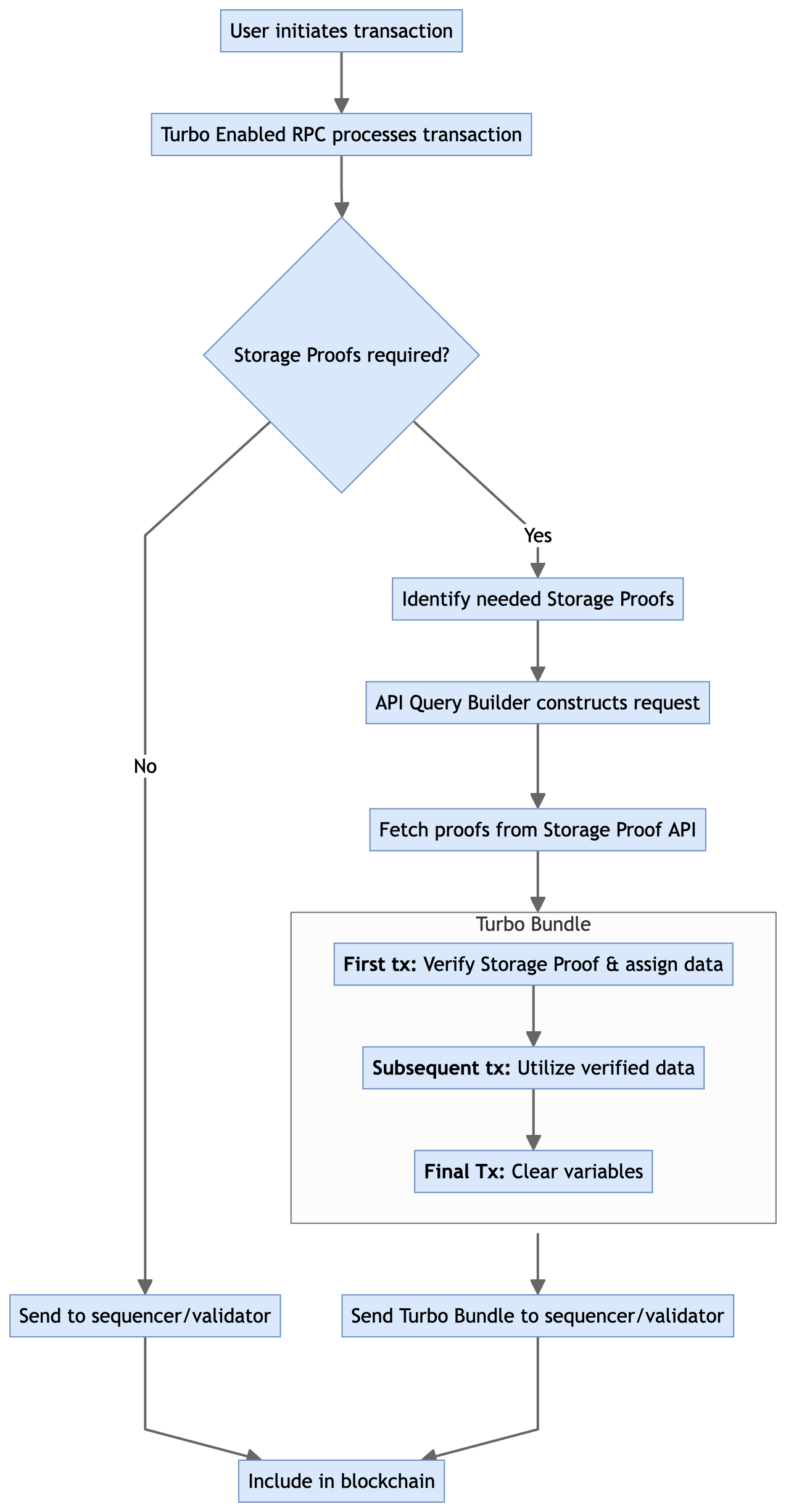
# Workflow

How Turbo Works

<figure><img src="https://2262114387-files.gitbook.io/~/files/v0/b/gitbook-x-prod.appspot.com/o/spaces%2FZwym4sEzqrcjD80S8guT%2Fuploads%2FC9w48J2R2EdmX875h3sR%2FTurboTX%20Lifecycle.png?alt=media&amp;token=52b9dfe5-18e3-48e9-99a5-e44a958097bb" alt=""><figcaption><p>Turbo Transaction Workflow</p></figcaption></figure>

1. **Transaction Initiation:** A user initiates a transaction targeting a Turbo-enabled smart contract.
2. **RPC Processing:** The Turbo Enabled RPC processes the transaction:
   * If no Storage Proofs are required, the transaction is directly broadcasted to the chain.
   * If Storage Proofs are needed but missing, the transaction fails, and the system identifies the required proofs.
3. **API Query Building:** The system constructs an API request to fetch necessary proofs from the off-chain Storage Proof API.
4. **Turbo Bundle Creation:** Upon receiving the Storage Proof, a Turbo Bundle is constructed:
   * The first transaction verifies the Storage Proof and assigns verified data to contract storage.
   * Subsequent transactions utilize these variables.
   * A final transaction clears the variables to maintain blockchain integrity.
5. **Blockchain Inclusion:** The Turbo Bundle is sent to a sequencer or validator for inclusion in the blockchain.


# RPC Endpoint

Turbo RPC Endpoint

The Turbo RPC Endpoint serves as the entry point for all Turbo Transactions. It allows developers and users to interact with Turbo-enabled smart contracts seamlessly, handling the complexities of Storage Proofs behind the scenes.

### What is Turbo RPC?

Turbo RPC is a specialized blockchain RPC endpoint that processes Turbo Transactions. When you submit a transaction through this RPC, it manages all necessary steps to include Storage Proofs if required, without any additional action from the user.

### Available Public Turbo RPCs

Here are the currently available public Turbo RPCs:

1. **Sepolia Testnet:** `https://eth-sepolia-turbo.api.herodotus.cloud/`
2. **zkSync Era Sepolia Testnet:** `https://zksync-turbo.api.herodotus.cloud/`

To use Turbo in your project, simply configure your web3 provider or wallet to use one of these RPC URLs when interacting with Turbo-enabled smart contracts on the respective network.

{% hint style="info" %}
As Turbo expands to support more networks, additional RPC endpoints will be added to this list.&#x20;
{% endhint %}


# Turbo Compute

Coming soon, Turbo Compute will extend the capabilities of Turbo by enabling developers to perform verifiable computations on historical blockchain data. This feature will leverage the same user-friendly interface as Turbo, making it easy for developers to integrate complex off-chain computations into their smart contracts.

Turbo Compute will utilize the Herodotus Data Processor (HDP) to define large sets of on-chain data and run computations over them in a fully sound and proven environment. This will open up new possibilities for developers, allowing them to build more sophisticated applications that can process and analyze blockchain data efficiently and securely.

Stay tuned for more details on how Turbo Compute will empower developers to create even more powerful and innovative blockchain applications.


# Overview

The core architecture behind Storage Proofs consists of several key components that work together.

## High-Level Component Overview

### Smart Contracts

These form the on-chain backbone of the Storage Proofs system.

| Contract Name              | Short Description                                       |
| -------------------------- | ------------------------------------------------------- |
| <h4>CommitmentsInbox</h4>  | Receives and processes data from other chains.          |
| <h4>FactsRegistry</h4>     | Stores and manages verified blockchain data.            |
| <h4>HeadersStore</h4>      | Efficiently stores and manages block headers.           |
| <h4>TimestampRemapper</h4> | Maintains mapping between timestamps and block numbers. |

Read more about these smart contracts [here](/architecture/smart-contracts).

## Off-Chain Proof Generation

This component generates the cryptographic proofs required for data verification.

## Storage Proof API

Provides an interface for developers to request Storage Proofs.

## Turbo

A smart contract interface that simplifies the integration of Storage Proofs into applications.

## Historical Block Hash Accumulator

Enables efficient access to historical block hashes.

## Native Messaging Systems

Facilitate secure communication between different blockchain networks.

## Component Interactions

When a smart contract on Chain B needs to access data from Chain A, it initiates a request through Turbo.&#x20;

Turbo interfaces with the Storage Proof API to request the necessary proofs.&#x20;

The Off-Chain Proof Generation system creates the required cryptographic proofs.&#x20;

These proofs are sent back through the API and Turbo to the requesting smart contract. The smart contract on Chain B uses the CommitmentsInbox to receive and verify the data from Chain A.&#x20;

The HeadersStore and FactsRegistry contracts store and manage the verified data. Other smart contracts can now access this verified data through the FactsRegistry.&#x20;

Throughout this process, the Historical Block Hash Accumulator enables efficient verification of historical data.&#x20;

Native Messaging Systems facilitate the secure transmission of critical data (like block hashes) between chains.


# Smart Contracts

## CommitmentsInbox&#x20;

**What it does:** The CommitmentsInbox contract receives and processes block headers and other data sent from Layer 1 to Layer 2. It verifies the authenticity of the data using signatures and stores it for further processing. \
\
**Relevance:** This contract is crucial for ensuring secure and reliable data transfer from Layer 1 to Layer 2, maintaining data integrity in cross-chain operations.

## FactsRegistry&#x20;

**What it does:** The FactsRegistry contract stores and manages verified blockchain data, such as account balances, storage values, and block headers. It provides functions to prove and access this data on-chain.&#x20;

**Relevance:** This contract is the core of the Storage Proofs system, allowing smart contracts to access and verify data from other chains or historical states trustlessly.

## HeadersStore&#x20;

**What it does:** The HeadersStore contract manages a Merkle Mountain Range (MMR) of block headers. It allows for efficient storage and verification of a large number of block headers.&#x20;

**Relevance:** This contract enables efficient historical data access and verification, which is essential for cross-chain and historical data proofs.

## TimestampRemapper&#x20;

**What it does:** The TimestampRemapper contract maintains a mapping between timestamps and block numbers. It allows for efficient querying of block numbers by timestamp.&#x20;

**Relevance:** This contract is important for time-based queries and proofs, allowing users to reference data by time rather than block number.

## AggregatorsFactory&#x20;

**What it does:** The AggregatorsFactory contract creates and manages instances of SharpFactsAggregator contracts. These aggregators are responsible for accumulating and verifying proofs from the Starkware SHARP.&#x20;

**Relevance:** This contract is crucial for the scalability and efficiency of the Storage Proofs system, allowing for batched verification of multiple proofs.

## SharpFactsAggregator&#x20;

**What it does:** The SharpFactsAggregator contract receives and verifies batches of proofs from the SHARP system. It updates the state of the HeadersStore and FactsRegistry based on these verified proofs.&#x20;

**Relevance:** This contract is key to the efficient and secure updating of the Storage Proofs system state, bridging the off-chain proof generation with on-chain state updates.

## HeadersProcessor&#x20;

**What it does:** The HeadersProcessor contract verifies and processes block headers. It checks the validity of block headers and their relationship to previously processed headers.&#x20;

**Relevance:** This contract ensures the integrity and continuity of the block header chain, which is fundamental to the security of the Storage Proofs system.

## L1MessagesProxy&#x20;

**What it does:** The L1MessagesProxy contract acts as a proxy for sending messages from Layer 2 to Layer 1. It aggregates messages and handles the cross-chain communication protocol.&#x20;

**Relevance:** This contract is essential for enabling Layer 2 to Layer 1 communication, allowing for data and state updates to be propagated back to the main chain.

These contracts work together to create a secure, efficient, and flexible system for proving and accessing blockchain data across different chains and historical states. The system leverages zero-knowledge proofs and efficient data structures to minimize on-chain computation and storage while maintaining high security guarantees.


# Cross-Chain Storage Proofs

Storage Proofs allow smart contracts on one blockchain to securely access and verify data from another blockchain. This cross-chain functionality is crucial for building interoperable decentralized applications. Let's explore how this process works and the role of key smart contracts involved.

## The Basic Flow

1. **Data Request**: A smart contract on Chain B (e.g., Starknet) needs to verify data from Chain A (e.g., Ethereum).
2. **Proof Generation**: Off-chain systems generate cryptographic proofs of the requested data from Chain A.
3. **Proof Submission**: These proofs are submitted to Chain B.
4. **Verification**: Smart contracts on Chain B verify the proofs and make the data available for use.

## Key Smart Contracts

Several smart contracts work together to make this process secure and efficient:

#### CommitmentsInbox (on Chain B)

* **Purpose**: Receives and processes data from Chain A.
* **Function**:
  1. Accepts block headers and other critical data from Chain A.
  2. Verifies the authenticity of this data using cryptographic signatures.
  3. Stores the verified data for further use.

#### HeadersStore (on Chain B)

* **Purpose**: Efficiently stores and manages a large number of block headers from Chain A.
* **Function**:
  1. Uses a data structure called a Merkle Mountain Range (MMR) to store block headers.
  2. Allows for efficient verification of historical block headers.

#### FactsRegistry (on Chain B)

* **Purpose**: Stores and manages verified blockchain data from Chain A.
* **Function**:
  1. Stores proven account balances, storage values, and other blockchain data.
  2. Provides functions for other smart contracts to access this verified data.

#### L1MessagesProxy (on Chain A)

* **Purpose**: Facilitates sending messages from Chain B back to Chain A.
* **Function**:
  1. Aggregates messages from Chain B.
  2. Sends these messages to Chain A in a gas-efficient manner.

## The Cross-Chain Proof Process

1. **Initiation**: A smart contract on Chain B requests data from Chain A.
2. **Data Transmission**:
   * The L1MessagesProxy on Chain A collects relevant block headers and data.
   * This information is sent to the CommitmentsInbox on Chain B.
3. **Data Processing**:
   * The CommitmentsInbox verifies the incoming data.
   * Verified block headers are stored in the HeadersStore.
4. **Proof Generation and Verification**:
   * Off-chain systems generate cryptographic proofs of the requested data.
   * These proofs are submitted to Chain B.
   * The FactsRegistry verifies these proofs against the data in the HeadersStore.
5. **Data Availability**:
   * Once verified, the data is stored in the FactsRegistry.
   * Smart contracts on Chain B can now access and use this verified data from Chain A.

## Security and Efficiency

This system ensures security through cryptographic verification at each step. It's also designed for efficiency:

* Only essential data (like block headers) is regularly transmitted between chains.
* Complex proofs are generated off-chain to minimize on-chain computation.
* Data structures like the Merkle Mountain Range allow for efficient storage and verification of large amounts of historical data.

By using this system of smart contracts and cryptographic proofs, Herodotus enables secure and efficient cross-chain data access, opening up new possibilities for blockchain interoperability.


# Native Messaging Systems

Introduction to Native Messaging Systems

Every Ethereum Layer 2 (L2), Layer 3 (L3), or App Chain has its own native messaging system. This system allows for secure communication between the layer in question and Ethereum mainnet (Layer 1). Storage Proofs leverage these native messaging systems to enhance the efficiency and security of cross-chain data verification.

## How Storage Proofs Utilize Native Messaging

Instead of sending large amounts of data between chains, Storage Proofs use these native messaging systems to send compact, critical pieces of information:

1. **Block Hashes**: A cryptographic fingerprint of a block's content.
2. **Root of Historical Block Hash Accumulator**: A single hash that represents a large set of historical block hashes.

## The Significance of This Approach

### Efficiency

By sending only block hashes or accumulator roots, the amount of data transmitted between chains is drastically reduced. This leads to:

* Lower gas costs
* Faster cross-chain communication
* Reduced congestion on both the source and destination chains

### Security

Using the native messaging system means relying on security mechanisms that are already in place and trusted. This approach:

* Doesn't introduce new trust assumptions
* Leverages the existing security model of the L2/L3/App Chain

### Trustlessness

Users of an L2, L3, or App Chain already trust its native messaging system for critical operations. By using this same system for Storage Proofs, the trustless nature of the blockchain ecosystem is maintained. Users don't need to place trust in any additional third parties or systems.

### Verifiability

Once the block hash or accumulator root is received on the destination chain:

* It can be used to verify any data from the source chain
* Proofs can be generated and verified against this trusted reference point

### Scalability

This approach scales well as the amount of data or the frequency of cross-chain communication increases. The size of the message sent through the native messaging system remains constant, regardless of the amount of data being proved.

## Practical Example

Consider a scenario where a smart contract on Optimism (an L2) needs to verify data from Ethereum mainnet:

1. The block hash or accumulator root from Ethereum is sent to Optimism using Optimism's native messaging system.
2. This information is received and stored on Optimism.
3. When a smart contract on Optimism needs to verify Ethereum data:
   * The relevant data and a proof are submitted to the contract.
   * The contract can verify this proof against the trusted block hash or accumulator root.
   * If the verification succeeds, the contract can trust and use the Ethereum data.

## Conclusion

By leveraging native messaging systems, Storage Proofs provide a secure, efficient, and scalable method for cross-chain data verification. This approach maintains the trustless nature of blockchain interactions while enabling powerful cross-chain functionalities.


# OP Stack Chains

Storage Proofs can enable historical and cross-chain data access for OP Stack chains like Optimism, Base, and Zora, the process leverages the unique architecture of these Layer 2 (L2) solutions. This page explains how Storage Proofs work in the context of OP Stack chains.

## Optimism Bedrock

The first crucial step in the Storage Proof Workflow is accessing the block hash. For OP Stack chains, we need to understand how L2 data gets committed to Layer 1 (L1).

### Block Hash Commitment

Since the launch of Optimism Bedrock, the block hash of an L2 block is committed to L1. Importantly, the structure of the block header on Optimism Bedrock mirrors that of the Ethereum Virtual Machine (EVM).

### L2OutputOracle Contract

The L2OutputOracle contract plays a pivotal role in this process. It emits `OutputProposed` events when new L2 outputs are proposed. The event structure is as follows:

```solidity
event OutputProposed(
    bytes32 indexed outputRoot,
    uint256 indexed l2OutputIndex,
    uint256 indexed l2BlockNumber,
    uint256 l1Timestamp
);
```

### Accessing L2 Output

To retrieve the L2 output, call the `getL2Output` read method using the `l2OutputIndex`. The returned output is the pre-image of the `outputRoot`, composed of:

```
version, l2_block_state_root, l2_withdrawals_storage_root, l2_block_hash
```

The `l2_block_hash` can be extracted from this pre-image and utilized in the Storage Proof process.

### OP Stack Indexer

To facilitate the indexing of OP Stack events, we've developed the OP Stack Indexer:

* **GitHub Repository**: <https://github.com/HerodotusDev/opstack_indexer>
* **Purpose**: Monitors Ethereum for all OP Stack events
* **Functionality**: Indexes Output Roots in a database
* **Supported Rollups**: Optimism, Base, Zora, and other OP Stack-based rollups

## Cross-Chain Workflow Examples

### Ethereum Data on OP Stack

To access Ethereum data from an OP Stack chain:

1. Access the Ethereum block hash.
2. Send the block hash to the Commitments Inbox, Headers Store, and Facts Registry smart contracts deployed on the OP Stack chain.
3. Proceed with the standard Storage Proof Workflow.

### OP Stack Data on Another OP Stack Chain

To access data from one OP Stack chain on another:

1. Use the OP Stack Indexer to index the block header (pre-image) of the source OP Stack block hash that has settled on L1.
2. Send the indexed block hash to the Commitments Inbox, Headers Store, and Facts Registry smart contracts deployed on the destination OP Stack chain.
3. Proceed with the standard Storage Proof Workflow.

### OP Stack Data on Starknet

To access OP Stack data from Starknet:

1. Use the OP Stack Indexer to index the block header (pre-image) of the OP Stack block hash that has settled on L1.
2. Send the indexed block hash to the Commitments Inbox, Headers Store, and Facts Registry smart contracts deployed on Starknet.
3. Proceed with the standard Storage Proof Workflow.

## Conclusion

The Storage Proof system for OP Stack chains leverages the L2 output commitment process to enable secure cross-chain data access. By understanding and utilizing the L2OutputOracle contract and the OP Stack Indexer, developers can create powerful cross-chain applications that maintain the security guarantees of both L1 and L2 networks.


# Using Storage Proof API

This guide will walk you through the process of submitting a Storage Proof API Batch query to prove the Ethereum balance of a specific account using Herodotus.

## Step 1: Prepare the API Request

First, we'll construct the API request to submit a batch query. We'll use the `/submit-batch-query` endpoint for this purpose.

#### Request Details:

* **Method**: POST
* **URL**: `https://api.herodotus.cloud/submit-batch-query`
* **Headers**:
  * `Content-Type: application/json`

#### Request Body:

```json
{
  "destinationChainId": "11155111",
  "fee": "0",
  "data": {
    "11155111": {
      "block:5150551": {
        "accounts": {
          "0x17C2D875CB397D813eAE817DaFD25807E348Df07": {
            "props": ["BALANCE"],
            "slots": []
          }
        }
      }
    }
  }
}
```

Let's break down the request body:

* `destinationChainId`: "11155111" represents the Ethereum Sepolia testnet, which is both the source and destination chain for this query.
* `fee`: Set to "0" as this is a testnet query.
* `data`: This object specifies what we want to prove:
  * `11155111`: Indicates we're querying the Ethereum Sepolia testnet (chain ID 11155111).
  * `block:5150551`: We're looking at a specific block number (5150551).
  * `accounts`: Specifies which accounts we're interested in.
  * `0x17C2D875CB397D813eAE817DaFD25807E348Df07`: The account address we want to prove the balance for.
  * `props`: We're requesting the "BALANCE" property.
  * `slots`: An empty array as we're not querying any specific storage slots.

## Step 2: Send the API Request

<figure><img src="https://2262114387-files.gitbook.io/~/files/v0/b/gitbook-x-prod.appspot.com/o/spaces%2FZwym4sEzqrcjD80S8guT%2Fuploads%2FuW4WbN7g5keunZSiuDNR%2FScreenshot%202024-07-15%20at%201.25.29%E2%80%AFPM.png?alt=media&amp;token=773adecc-faa3-448f-9e42-27f85056418b" alt=""><figcaption></figcaption></figure>

Use your preferred method (curl, Postman, or a programming language of your choice) to send this POST request to the Herodotus API.

Don't forget to include your API key as a query parameter:

```
https://api.herodotus.cloud/submit-batch-query?apiKey=YOUR_API_KEY_HERE
```

## Step 3: Handle the API Response

If successful, you'll receive a response with an `internalId`. This ID is crucial for checking the status of your query later.

Example response:

```json
{
  "internalId": "01J2V235ABJY55JS2MY051ZJFJ"
}
```

## Step 4: Check Query Status

### API Method

<figure><img src="https://2262114387-files.gitbook.io/~/files/v0/b/gitbook-x-prod.appspot.com/o/spaces%2FZwym4sEzqrcjD80S8guT%2Fuploads%2F49grkeL5r5JZU6g3O3s5%2FScreenshot%202024-07-15%20at%201.30.46%E2%80%AFPM.png?alt=media&amp;token=b30b4691-ca63-4aa9-bec9-e2fc0822bb80" alt=""><figcaption></figcaption></figure>

You can check the status of your query using the `/batch-query-status` endpoint:

{% code overflow="wrap" %}

```
GET https://api.herodotus.cloud/batch-query-status?apiKey=YOUR_API_KEY_HERE&batchQueryId=01J2V235ABJY55JS2MY051ZJFJ
```

{% endcode %}

The response will indicate whether the query is "DONE", "IN\_PROGRESS", or "REJECTED".

### Storage Proof Dashboard

Alternatively, you can monitor the progress of your Storage Proof query using the Herodotus Storage Proof Dashboard. This visual interface provides detailed information about your batch query and its status. Here's how to use it:

1. Navigate to the Explorer section of the Herodotus platform.
2. Enter your Batch Query ID in the search bar at the top of the page.
3. The dashboard will display detailed information about your query, including:
   * Batch Query ID
   * Submission Timestamp
   * Destination Chain
   * Fee
   * Current Status (e.g., RECEIVED, ACCEPTED, DONE)

<figure><img src="https://2262114387-files.gitbook.io/~/files/v0/b/gitbook-x-prod.appspot.com/o/spaces%2FZwym4sEzqrcjD80S8guT%2Fuploads%2FKRNX5rOH8co7D8ul9Lqx%2Fdashboard.herodotus.dev_explorer_query_01J2V235ABJY55JS2MY051ZJFJ_ACCEPTED.png?alt=media&amp;token=ab16328e-e320-4292-bb0c-2a9a73b748aa" alt="" width="375"><figcaption></figcaption></figure>

4. You can see the progress of individual queries within your batch. Each query goes through several steps:
   * INITIAL\_STATE
   * BLOCKHASH\_AVAILABLE
   * HEADER\_ACCUMULATED
   * ACCOUNT\_ACCUMULATED

<figure><img src="https://2262114387-files.gitbook.io/~/files/v0/b/gitbook-x-prod.appspot.com/o/spaces%2FZwym4sEzqrcjD80S8guT%2Fuploads%2FKBFoVudolP28hKp4Lsuk%2Fdashboard.herodotus.dev_explorer_query_01J2V235ABJY55JS2MY051ZJFJ_DETAILS.png?alt=media&amp;token=e38cc051-3a99-43f1-99e4-e7fb7fc113dc" alt="" width="375"><figcaption></figcaption></figure>

5. The dashboard updates in real-time, showing the status of each step (COMPLETED, IN\_PROGRESS) and the timestamp for when each step started and completed.
6. Once all steps are completed, the overall status of your batch query will change to DONE, indicating that the Storage Proof is ready.

<div><figure><img src="https://2262114387-files.gitbook.io/~/files/v0/b/gitbook-x-prod.appspot.com/o/spaces%2FZwym4sEzqrcjD80S8guT%2Fuploads%2F4c6lOP7RXuiNtgPrZlyI%2Fdashboard.herodotus.dev_explorer_query_01J2V235ABJY55JS2MY051ZJFJ_DONE.png?alt=media&amp;token=ed0e17e2-f9d2-4272-95ee-96503a00f031" alt="" width="375"><figcaption></figcaption></figure> <figure><img src="https://2262114387-files.gitbook.io/~/files/v0/b/gitbook-x-prod.appspot.com/o/spaces%2FZwym4sEzqrcjD80S8guT%2Fuploads%2FGkJ5AGBLA2658XyySYnf%2Fdashboard.herodotus.dev_explorer_query_01J2V235ABJY55JS2MY051ZJFJ_DONE2.png?alt=media&amp;token=7837d226-cfda-4bf5-ba0d-bc57025bdabe" alt="" width="375"><figcaption></figcaption></figure></div>

This visual dashboard provides an intuitive way to track the progress of your Storage Proofs and understand the various stages involved in generating the proof.

You can view the request related to this tutorial here: <https://dashboard.herodotus.dev/explorer/query/01J2V235ABJY55JS2MY051ZJFJ>

## Step 5: Retrieve Results

Once the status of your query is "DONE", you can retrieve and verify the results of your Storage Proof. This process involves interacting with the Herodotus Facts Registry contract on the destination chain (in this case, Sepolia). Here's how to do it:

**Facts Registry Contract**

At the time of this tutorial, the current Ethereum Sepolia Facts Registry contract address is:

```
0x7Cb1C4a51575Dc4505D8a8Ea361fc07346E5BC02
```

#### Retrieving and Verifying Data

<figure><img src="https://2262114387-files.gitbook.io/~/files/v0/b/gitbook-x-prod.appspot.com/o/spaces%2FZwym4sEzqrcjD80S8guT%2Fuploads%2F5Ffrnh1QpPTuoJJEAUx0%2Fsepolia.etherscan.io_address_0x7Cb1C4a51575Dc4505D8a8Ea361fc07346E5BC02_method.png?alt=media&amp;token=91885478-7e0b-4b78-8930-12c36a1d317b" alt=""><figcaption></figcaption></figure>

To access the proven data, use the `accountField` method in the FactsRegistry contract. This method takes three parameters:

* The address of the contract you're proving data for
* The block number at which you're proving the data
* The storage slot you're accessing

We remove the padded zeros, convert to a decimal.

<figure><img src="https://2262114387-files.gitbook.io/~/files/v0/b/gitbook-x-prod.appspot.com/o/spaces%2FZwym4sEzqrcjD80S8guT%2Fuploads%2FFkM4MrTA9l6LiB9c5kow%2FScreenshot%202024-07-15%20at%202.12.29%E2%80%AFPM.png?alt=media&amp;token=9eae7fe5-1af2-411f-be39-c75a1363be84" alt=""><figcaption><p><a href="https://www.rapidtables.com/convert/number/hex-to-decimal.html?x=1043251713F3CC4E87">https://www.rapidtables.com/convert/number/hex-to-decimal.html?x=1043251713F3CC4E87</a></p></figcaption></figure>

Next we divide by $$10^{18}$$:

$$
299986203928494362247/10^{18}= 299.986203928
$$

<figure><img src="https://2262114387-files.gitbook.io/~/files/v0/b/gitbook-x-prod.appspot.com/o/spaces%2FZwym4sEzqrcjD80S8guT%2Fuploads%2F0aFD5RQdw1FLkdmNseYA%2Fsepolia.etherscan.io_balancecheck-tool_a%3D0x17C2D875CB397D813eAE817DaFD25807E348Df07_historical_balance_mini.png?alt=media&amp;token=f0fb1bed-3266-4ba2-a00b-7d5800141138" alt=""><figcaption><p><a href="https://sepolia.etherscan.io/balancecheck-tool?a=0x17C2D875CB397D813eAE817DaFD25807E348Df07">https://sepolia.etherscan.io/balancecheck-tool?a=0x17C2D875CB397D813eAE817DaFD25807E348Df07</a></p></figcaption></figure>

We can see that the balance matches the accounts historical balance as we expect.&#x20;

The account balance has now been successfully proven and now can be retrieved on-chain with the FactsRegistry contract.

## Conclusion

You've now successfully submitted a Storage Proof API Batch query to prove the Ethereum balance of account `0x17C2D875CB397D813eAE817DaFD25807E348Df07` on the Ethereum Sepolia testnet at a specific block. This proven data can be used in various applications where verifiable on-chain data is required.

By following these steps, you can leverage Storage Proofs to verify on-chain data in a trustless manner, opening up possibilities for more secure and transparent blockchain applications.


# Integrating Storage Proofs

This guide will walk you through the process of integrating Storage Proofs into your decentralized applications (dApps). By following these steps, you'll be able to leverage verifiable cross-chain data in your smart contracts.

## Prerequisites

* Basic knowledge of Solidity and smart contract development
* Familiarity with the Herodotus Storage Proof API
* An active Herodotus API key

## 1. Set Up Your Development Environment

1. Ensure you have a development environment set up for Ethereum smart contract development (e.g., Hardhat, Truffle, or Foundry).
2. Install the necessary dependencies, including OpenZeppelin contracts for standard implementations.

## 2. Implement the IFactsRegistry Interface

Create an interface in your smart contract to interact with the Herodotus Facts Registry:

```solidity
interface IFactsRegistry {
    function accountField(
        address account,
        uint256 blockNumber,
        uint8 field
    ) external view returns (bytes32);

    function accountStorageSlotValues(
        address account,
        uint256 blockNumber,
        bytes32 slot
    ) external view returns (bytes32);
}
```

## 3. Set Up Your Smart Contract

Create your smart contract and include the IFactsRegistry interface:

```solidity
pragma solidity ^0.8.0;

import "@openzeppelin/contracts/access/Ownable.sol";

contract MyStorageProofContract is Ownable {
    IFactsRegistry public factsRegistry;

    constructor(address _factsRegistry) {
        factsRegistry = IFactsRegistry(_factsRegistry);
    }

    // Contract logic goes here
}
```

## 4. Implement Storage Proof Verification

Add functions to your contract that use the Facts Registry to verify data:

```solidity
function verifyBalance(address account, uint256 blockNumber) public view returns (uint256) {
    bytes32 balanceField = factsRegistry.accountField(account, blockNumber, 1); // 1 represents BALANCE
    return uint256(balanceField);
}

function verifyStorageSlot(address account, uint256 blockNumber, bytes32 slot) public view returns (bytes32) {
    return factsRegistry.accountStorageSlotValues(account, blockNumber, slot);
}
```

## 5. Use Verified Data in Your Contract Logic

Implement your contract's core logic using the verified data:

```solidity
function executeBasedOnVerifiedBalance(address account, uint256 blockNumber, uint256 threshold) public {
    uint256 verifiedBalance = verifyBalance(account, blockNumber);
    
    if (verifiedBalance > threshold) {
        // Execute some logic
    } else {
        // Execute alternative logic
    }
}
```

## 6. Deploy and Interact

1. Deploy your contract to the desired network, providing the address of the appropriate Facts Registry contract for that network.
2. Interact with your contract, ensuring that the necessary Storage Proofs have been submitted and processed before calling functions that rely on verified data.

## Best Practices

1. **Error Handling**: Implement proper error handling for cases where proofs might not be available yet.
2. **Gas Optimization**: Be mindful of gas costs when verifying multiple pieces of data.
3. **Updating Facts Registry**: Implement a function to update the Facts Registry address in case of upgrades.
4. **Timeouts**: Consider implementing timeouts for data verification to ensure your contract doesn't rely on outdated information.

## Using Turbo

For a more streamlined integration, consider using Turbo. Turbo abstracts away much of the complexity of working with Storage Proofs. Here's a basic example:

```solidity
import "@herodotus/turbo/contracts/ITurboSwap.sol";

contract MyTurboContract {
    ITurboSwap public turboSwap;

    constructor(address _turboSwap) {
        turboSwap = ITurboSwap(_turboSwap);
    }

    function verifyBalanceWithTurbo(uint256 chainId, uint256 blockNumber, address account) public returns (bytes32) {
        return turboSwap.accounts(chainId, blockNumber, account, AccountFields.BALANCE);
    }
}
```

Learn more about how you can use Turbo to significantly simplify your integration process [here](/solutions/turbo).

## Conclusion

Integrating Storage Proofs into your dApps allows you to leverage verified cross-chain data, opening up new possibilities for decentralized applications. As you become more comfortable with the basics, explore more complex proof types and consider using Turbo for even easier integration.

Remember to always test thoroughly and consider the security implications of relying on external data in your smart contracts. Happy building!


# Building a Storage Proof Powered Bridge

WIP!!!!

{% hint style="info" %}
For a more comprehensive, step-by-step guide with specific implementation details, please refer to our Ethereum <> Starknet Yet Another Bridge in-depth tutorial at: <https://github.com/HerodotusDev/yab-herodotus/tree/main>
{% endhint %}

This tutorial provides an overview of using Storage Proofs to create a secure bridge between EVM-compatible blockchain networks. We'll cover the core concepts and provide code examples for building a bridge using Storage Proofs and the FactsRegistry.

### Prerequisites

* Understanding of smart contracts and blockchain concepts
* Familiarity with Solidity and JavaScript/TypeScript
* Access to the Storage Proof API

### Step 1: Identify the Contract Storage Layout

First, determine the storage layout of the contract you want to prove. Let's say we're interested in a `transfers` mapping:

```solidity
mapping(bytes32 => struct Transfer) public transfers;
```

To obtain the storage layout:

1. Use a Solidity storage layout tool or plugin
2. Or use an online service like storage.herodotus.dev

Note the slot number for the `transfers` mapping from the output.

### Step 2: Mapping Slot Index

For mappings, we need to calculate the exact storage slot for a specific key. Here's a generic JavaScript function to do this:

```typescript
const ethers = require('ethers');

function getSlot(mappingSlot, key) {
  return ethers.utils.keccak256(
    ethers.utils.defaultAbiCoder.encode(
      ['bytes32', 'uint256'],
      [key, mappingSlot]
    )
  );
}
```

Usage example:

```typescript
const TRANSFERS_SLOT = 5; // obtained from storage layout
const key = '0x1234...'; // your specific key
const slot = getSlot(TRANSFERS_SLOT, key);
console.log('Calculated slot:', slot);
```

### Step 3: Request a Storage Proof

With the correct storage slot, request a Storage Proof. Here's a generic example using fetch:

```typescript
async function requestStorageProof(chainId, contractAddress, slot, blockNumber, apiKey) {
  const response = await fetch('https://api.herodotus.cloud/submit-batch-query', {
    method: 'POST',
    headers: {
      'Content-Type': 'application/json',
      'Authorization': `Bearer ${apiKey}`
    },
    body: JSON.stringify({
      chainId,
      contractAddress,
      slots: [slot],
      blockNumber
    })
  });

  return await response.json();
}

// Usage
const proofRequest = await requestStorageProof(
  1, // Ethereum mainnet
  '0x1234...', // Your contract address
  slot,
  14000000, // Block number
  'YOUR_API_KEY'
);
console.log('Proof request:', proofRequest);
```

### Step 4: Access Proven Slots

Once the Storage Proof is generated, access the proven data:

```typescript
async function getProvenData(taskId, apiKey) {
  const response = await fetch(`https://api.herodotus.cloud/batch-query-status/${taskId}`, {
    headers: {
      'Authorization': `Bearer ${apiKey}`
    }
  });

  const proofData = await response.json();
  
  if (proofData.status === 'DONE') {
    const slotValue = proofData.slots[0].value;
    console.log('Proven slot value:', slotValue);
    return slotValue;
  } else {
    console.log('Proof not yet finalized');
    return null;
  }
}

// Usage
const provenValue = await getProvenData(proofRequest.taskId, 'YOUR_API_KEY');
```

### Step 5: Implement On-Chain Verification

To use the Storage Proof in your bridge contract, implement a verification function using the FactsRegistry. Here's a Solidity example:

```solidity
pragma solidity ^0.8.0;

import "@openzeppelin/contracts/token/ERC20/IERC20.sol";

interface IFactsRegistry {
    function verifyStorage(
        address account,
        uint256 blockNumber,
        bytes32 slot,
        bytes memory storageSlotTrieProof
    ) external view returns (bytes32 slotValue);
}

contract Bridge {
    IFactsRegistry public factsRegistry;
    IERC20 public token;
    uint256 public sourceChainId;
    address public sourceTokenContract;

    constructor(address _factsRegistry, address _token, uint256 _sourceChainId, address _sourceTokenContract) {
        factsRegistry = IFactsRegistry(_factsRegistry);
        token = IERC20(_token);
        sourceChainId = _sourceChainId;
        sourceTokenContract = _sourceTokenContract;
    }

    function bridgeTransfer(
        bytes32 transferId,
        uint256 blockNumber,
        bytes memory storageSlotTrieProof
    ) external {
        bytes32 slot = keccak256(abi.encode(transferId, uint256(5))); // Assuming transfers mapping is at slot 5
        
        bytes32 slotValue = factsRegistry.verifyStorage(
            sourceTokenContract,
            blockNumber,
            slot,
            storageSlotTrieProof
        );

        (address recipient, uint256 amount) = decodeSlotValue(slotValue);

        require(recipient != address(0), "Invalid recipient");
        require(amount > 0, "Invalid amount");

        // Perform bridge logic
        token.transfer(recipient, amount);

        emit TransferBridged(transferId, recipient, amount);
    }

    function decodeSlotValue(bytes32 slotValue) internal pure returns (address recipient, uint256 amount) {
        // Implement decoding logic based on your data structure
        // This is a simplified example
        recipient = address(uint160(uint256(slotValue)));
        amount = uint256(slotValue) >> 160;
    }

    event TransferBridged(bytes32 indexed transferId, address indexed recipient, uint256 amount);
}
```

This implementation uses the `verifyStorage` function from the FactsRegistry to verify the Storage Proof on-chain. The `bridgeTransfer` function takes the necessary parameters to verify the storage slot and execute the bridge logic.

### Conclusion

By following these steps and using the FactsRegistry, you can create a bridge that uses Storage Proofs to securely transfer and verify data between EVM-compatible chains. This approach enhances security by cryptographically proving the state of one chain on another, reducing trust assumptions compared to traditional oracle-based bridges.

Remember to adapt these examples to your specific environment, contract structure, and chosen libraries. Always thoroughly test your implementation and consider potential edge cases specific to your use case.


# Writing Turbo Smart Contracts

Developing with Herodotus Turbo for Solidity and Cairo smart contract developers is quite convenient as it unlocks new paradigms and features without compromising on the existing technology or adding additional overheads to the tooling used and the way to deal with the chain specificities.

However, there are some caveats to take into consideration to get the most out of Turbo and integrate it seamlessly.

## 1. Integration of Turbo Interface

To use Turbo, developers need to integrate the Turbo interface into their smart contracts. This involves importing the necessary Turbo ERC1967 proxy contract and utilizing its functions for specifying intents (i.e., proofs queries).

```solidity
// ITurboSwap and periphery interfaces can be found here:
// https://github.com/HerodotusDev/turbo-contracts/blob/main/src/interfaces/ITurboSwap.sol

contract MyTurboContract {
    ITurboSwap public turbo;

    constructor(address _turboAddress) {
        turbo = ITurboSwap(_turboAddress);
    }

    // Contract logic using Turbo
    // function myContractFunction(...)
}
```

## **2. Synchronous Data Reads**

Instead of complex logic to handle cross-chain data access, Turbo allows developers to make data queries using simple function calls:

```solidity
// HeaderProperty interface is defined here:
// https://github.com/HerodotusDev/turbo-contracts/blob/main/src/lib/HeaderProperty.sol
// To use other properties, ensure that they are also supported by the API as well.
// Supported fields are defined here in POST /submit-batch-query: https://api.herodotus.cloud/docs/static/index.html#/

function myContractFunction(
    uint256 chainId,
    uint256 blockNumber
) external {
    bytes32 blockTimestamp = turbo.headers(
        chainId,
        blockNumber,
        HeaderProperty.TIMESTAMP
    );
    // Do anything with the resolved value
    // (i.e., in this case, the timestamp of that given block).
}
```

{% hint style="info" %}
ℹ️ **Make sure that all Turbo calls are not inter-dependents** (i.e., the resolved value of one query cannot be used as the input of another one). *However, in the near future, nested interdependent queries will be made possible.*
{% endhint %}

## **3. Special RPC Requirement**

Transactions interacting with Turbo-integrated contracts must be submitted through a special Turbo RPC. This is a key difference from standard Solidity development, where transactions can be sent through any compatible RPC.

The rationale behind it is that in order to achieve transactions that appear to be synchronous from the execution layer, we need to catch the intents first through our Turbo-enabled RPC, defer the proving to our API and broadcast the transaction to the chain as fast as possible.

{% hint style="info" %}
ℹ️ Even though we recommend using Turbo as it handles the complexity behind the scenes, and allows for a more straightforward developer & user experience, it is possible to integrate with Storage Proofs by integrating directly with the API instead, skipping the specialized RPC part. If unsure, please reach out.
{% endhint %}

## **4. Extended Data Access**

Turbo contracts can access a wider range of data across different chains and layers, including headers, accounts and storage slots.

This capability goes beyond what's typically available in standard Solidity contracts, so developers can leverage richer and more diverse data sets to enhance their dApps' functionality and user experience.

{% hint style="info" %}
Checkout some use cases that you can build with Turbo [here](/getting-started/use-cases)!&#x20;
{% endhint %}


# Sending Turbo Transactions

Sending transactions that interact with Turbo-enabled smart contracts differs from sending regular Ethereum transactions and requires some additional steps to ensure proper execution. Here's a detailed guide on how to send Turbo transactions:

## 1. Add a custom network to your provider

The first and most crucial step in sending a Turbo transaction is to use a Turbo-enabled RPC Endpoint.

Unlike regular Ethereum transactions that can be sent through any compatible RPC, Turbo transactions must be processed through a special RPC that understands and can handle Turbo-specific operations, that is simulating transactions and proving required data when necessary.

**Actions Steps (for browser)**

1. Open your browser wallet, go to `Networks` and `Add a Custom Network`.
2. Fill in the input form based on the corresponding Turbo-enabled RPC you are trying to interact with for a given chain. **View the list of supported networks** [**here**](https://docs.herodotus.dev/herodotus-docs/developers/turbo/supported-networks)**.**

<figure><img src="https://2262114387-files.gitbook.io/~/files/v0/b/gitbook-x-prod.appspot.com/o/spaces%2FZwym4sEzqrcjD80S8guT%2Fuploads%2F3tC5HIkRnot8ujUWGiy8%2Ft.png?alt=media&amp;token=f3c220f2-a334-43de-bc82-05c82f75460b" alt="" width="375"><figcaption></figcaption></figure>

3. That’s all, you can now send Turbo transactions like you already do elsewhere!

{% hint style="info" %}
Keep in mind that due to its design which is comprised of upstream proving, Turbo transactions usually take longer to complete and **it might take several minutes** before they get broadcasted on-chain.
{% endhint %}

## 2. Wait for Confirmation

To retrieve the status of a Turbo transaction, you can use the transaction hash returned by the Turbo RPC to query the status. Here's how it works:

1. After sending a Turbo transaction, you'll receive a transaction hash from the RPC.
2. Use this hash to make a GET query in the following format: [`https://TURBO_RPC_URL/herodotus-req-id?txHash=YOUR_TRANSACTION_HASH`](https://eth-sepolia-turbo.api.herodotus.cloud/herodotus-req-id?txHash=YOUR_TRANSACTION_HASH)

For example:&#x20;

<pre data-overflow="wrap" data-full-width="false"><code><strong>GET https://eth-sepolia-turbo.api.herodotus.cloud/herodotus-req-id?txHash=0x42a415fb9afe239ca755ffe8bf2c53971391140e3a7b321f247f03e1a6dff139
</strong></code></pre>

3. This query will return a JSON object containing a `herdotusApiTransactionIdentifier`. For instance:

```json
{
  "herdotusApiTransactionIdentifier": "01HYDSWQTY2GXCZ8SVVNWKC0N3"
}
```

4. You can then use this identifier to view detailed transaction information on the Herodotus Dashboard. Simply append the identifier to the following URL: `https://dashboard.herodotus.dev/explorer/query/YOUR_IDENTIFIER` . For example <https://dashboard.herodotus.dev/explorer/query/01HYDSWQTY2GXCZ8SVVNWKC0N3>

<figure><img src="https://2262114387-files.gitbook.io/~/files/v0/b/gitbook-x-prod.appspot.com/o/spaces%2FZwym4sEzqrcjD80S8guT%2Fuploads%2Fhtze4kfcyVO3obICp7RX%2Ft2.png?alt=media&amp;token=9c923c55-2cfd-40a8-bbac-849310c09c05" alt="" width="375"><figcaption></figcaption></figure>

5. The dashboard UI will automatically update itself throughout the lifecycle of the Turbo transaction and will eventually display the user transaction sent on-chain.

## 3. Gas considerations (for Turbo app developers)

When the Turbo-enabled RPC receives a Turbo transaction using the `eth_sendRawTransaction` method (i.e., a smart contract call under which at least one Storage Proof's underlying data is being accessed), the transaction itself has already been signed by the sender and its gas parameters (`gasLimit`, `maxPriorityFeePerGas`, `maxFeePerGas` etc) are immutable.

* Before being able to broadcast the origin transaction to the network, often times some proving is required (e.g., proving block headers, accounts properties, storage slots...) and some time elapses before the proofs are settled and verified on-chain (i.e., the proving time).
* By the time the origin transaction is ready to be sent to the network (i.e., when all requested data has been proven), some time passed and the network gas might have changed, potentially drastically, especially during gas spikes. Broadcasting the transaction further is such situation can lead to a stuck or dropped transaction by the sequencer as the gas parameters initially signed may not reflect the current ones.
* We are internally working on features leveraging account abstraction to mitigate this problem.

{% hint style="info" %}
An easy workaround is to inflate the gas price of the signed transaction to absorb any “gas slippage” that might arise between the time the transaction is signed and the time it’s ready to be sent.
{% endhint %}


# Contract Addresses

This page lists the current contract addresses for Storage Proofs across various networks. Please note that these addresses may change over time, so always refer to this page for the most up-to-date information.

### Ethereum Mainnet

| Contract Type | Address                                    |
| ------------- | ------------------------------------------ |
| Outbox        | 0x20827008C4B7104332CfFF86CcBc50e9043Ec704 |

### Ethereum Sepolia Testnet

| Contract Type     | Address                                    |
| ----------------- | ------------------------------------------ |
| FactRegistry      | 0x7Cb1C4a51575Dc4505D8a8Ea361fc07346E5BC02 |
| HeaderStore       | 0x32D0256C4bFf711444f50bE6c254114e22029f2c |
| Inbox             | 0x29777B5fF1641c9461a2A17A03c35B14abd1e8F4 |
| Outbox            | 0x955F71074566Ace728d8Ed30Ec16F34c335fd80d |
| AggregatorFactory | 0x70C61dd17b7207B450Cb7DeDC92C1707A07a1213 |
| HdpExecutionStore | 0x0ecb09D7E3b240DD01f34490875639427372b0aF |

### Starknet Mainnet

| Contract Type | Address                                                            |
| ------------- | ------------------------------------------------------------------ |
| FactRegistry  | 0x014bf62fadb41d8f899bb5afeeb2da486fcfd8431852def56c5f10e45ae72765 |
| HeaderStore   | 0x00c28c852f2811c77ea0e0d17576d0b7fbb392299c580f2edb6190580a1dd5cd |
| Remapper      | 0x0050e1a1a352049b29103d8b42cf00f6faa2d5e88e94ed71962a1bfb24e5b0b2 |
| Inbox         | 0x05a0c76f73a3765f3e6b445ef005c260ca00bff227e79d844cb7682814bd95f1 |

### Starknet Sepolia Testnet

| Contract Type | Address                                                            |
| ------------- | ------------------------------------------------------------------ |
| FactRegistry  | 0x07d3550237ecf2d6ddef9b78e59b38647ee511467fe000ce276f245a006b40bc |
| HeaderStore   | 0x01728f6d32895aeb96945ff018bd8fd7171a380ac868def62c7e07d00d7c2abf |
| Remapper      | 0x00cdd51fbc4e008f4ef807eaf26f5043521ef5931bbb1e04032a25bd845d286b |
| Inbox         | 0x054f677f3e952d023e2f31d74606270b676eaf493befbcfa2111f2b96a242362 |

### zkSync Era Sepolia Testnet

| Contract Type | Address                                    |
| ------------- | ------------------------------------------ |
| FactRegistry  | 0x1DF62d2Bd632067479b9d60E7CDCc2c1a1a8d95d |
| HeaderStore   | 0xC0096ba3E31f05DB7CA6cAd687a7194f71BF6fc8 |
| Inbox         | 0x0e89d4373cFf9B0924E352b66783a3FB9Ee8e1F9 |

### Optimism Sepolia Testnet

| Contract Type | Address                                    |
| ------------- | ------------------------------------------ |
| FactRegistry  | 0xC5fCC6A1455da6fB6fb3d66bdE1d3a83a693415b |
| HeaderStore   | 0x2f6160bF1C145891C1857A8d382f8AAABB33C030 |
| Inbox         | 0xb18a66Fbab151C42A81E7C53D11810B6C632987B |

Please ensure you're using the correct contract addresses for your target network when interacting with Storage Proofs.


# Supported Networks

Storage Proofs support various networks, enabling cross-chain data access and verification. Below is a list of currently supported networks and their connections.

### Mainnet

| Origin Chain | Destination Chain |
| ------------ | ----------------- |
| Ethereum     | Starknet          |

### Testnet

| Origin Chain     | Destination Chain  |
| ---------------- | ------------------ |
| Ethereum Sepolia | Ethereum Sepolia   |
| Ethereum Sepolia | Starknet Sepolia   |
| Ethereum Sepolia | zkSync Era Sepolia |
| Ethereum Sepolia | Optimism Sepolia   |
| Optimism Sepolia | Starknet Sepolia   |

## Chain IDs

For reference, here are the chain IDs for the supported networks:

* Ethereum Mainnet: 1
* Ethereum Sepolia: 11155111
* Starknet Mainnet: STARKNET
* Starknet Sepolia: SN\_SEPOLIA
* zkSync Era Sepolia: 300
* Optimism Sepolia: 11155420

When using the Herodotus API or interacting with smart contracts, make sure to use the correct chain IDs and contract addresses for your desired network.

## Future Support

We are continuously working on expanding our network support. For the most up-to-date information on supported networks or to request support for a specific network, please contact our team or check our official announcements.


# Glossary

#### Account Fields

Specific properties of an Ethereum account, such as balance, nonce, or storage root, that can be verified using Storage Proofs.

#### API Key

A unique identifier used to authenticate requests to the Storage Proof API.

#### Block Hash

A unique identifier for a block in a blockchain, typically a cryptographic hash of the block's header.

#### Block Header

A part of a block containing metadata about the block, including references to previous blocks, merkle roots, and other blockchain-specific information.

#### Blockhash Accumulator

A data structure used to efficiently store and verify historical block hashes.

#### Cross-Chain

Referring to interactions or data transfers between different blockchain networks.

#### Destination Chain

The blockchain network where the Storage Proof will be verified and used.

#### Facts Registry

A smart contract that stores verified blockchain data, allowing other contracts to access this information.

#### Herodotus

The company building Storage Proofs, and the platform providing the Storage Proof infrastructure, tooling and services.

#### Historical Data

Data from past blocks in a blockchain, which may not be directly accessible in current smart contracts.

#### Inclusion Proof

A cryptographic proof demonstrating that a piece of data is part of a larger data set without revealing the entire set.

#### Merkle Mountain Range (MMR)

A data structure used for efficient proof generation and verification, particularly useful for blockchain data.

#### Merkle Proof

A cryptographic proof used to verify the inclusion of data in a Merkle tree without needing the entire tree.

#### Merkle Root

The root hash of a Merkle tree, representing a cryptographic summary of all data in the tree.

#### Origin Chain

The blockchain network from which data is being proved.

#### Proof of Computation

A cryptographic proof that a certain computation was performed correctly.

#### Smart Contract

Self-executing contracts with the terms of the agreement directly written into code.

#### STARK (Scalable Transparent ARgument of Knowledge)

A type of zero-knowledge proof system used in Herodotus for efficient and secure proof generation and verification.

#### State Root

The root hash of the state trie in Ethereum, representing the entire state of the blockchain at a given block.

#### Storage Proof

A cryptographic proof that verifies the state or existence of data in a blockchain without needing to access the entire blockchain.&#x20;

#### Storage Slot

A specific location in a smart contract's storage where data is kept.

#### Turbo

A Herodotus product that simplifies the integration of Storage Proofs into smart contracts.

#### Turbo Compute

An advanced feature of Turbo allowing for verifiable off-chain compute with on-chain verification.

#### Zero-Knowledge Proof

A cryptographic method by which one party can prove to another party that a given statement is true without conveying any additional information.